How to make a YouTube thumbnail with AI
The YouTube Thumbnails agent draws click worthy 16:9 preview images for your videos. It always proposes three different concepts, which is exactly what the built in thumbnail test on YouTube can compare, so the platform picks the winner for you. Attach a photo of the host and the face on the thumbnail stays recognisable.
Updated: August 10, 2026
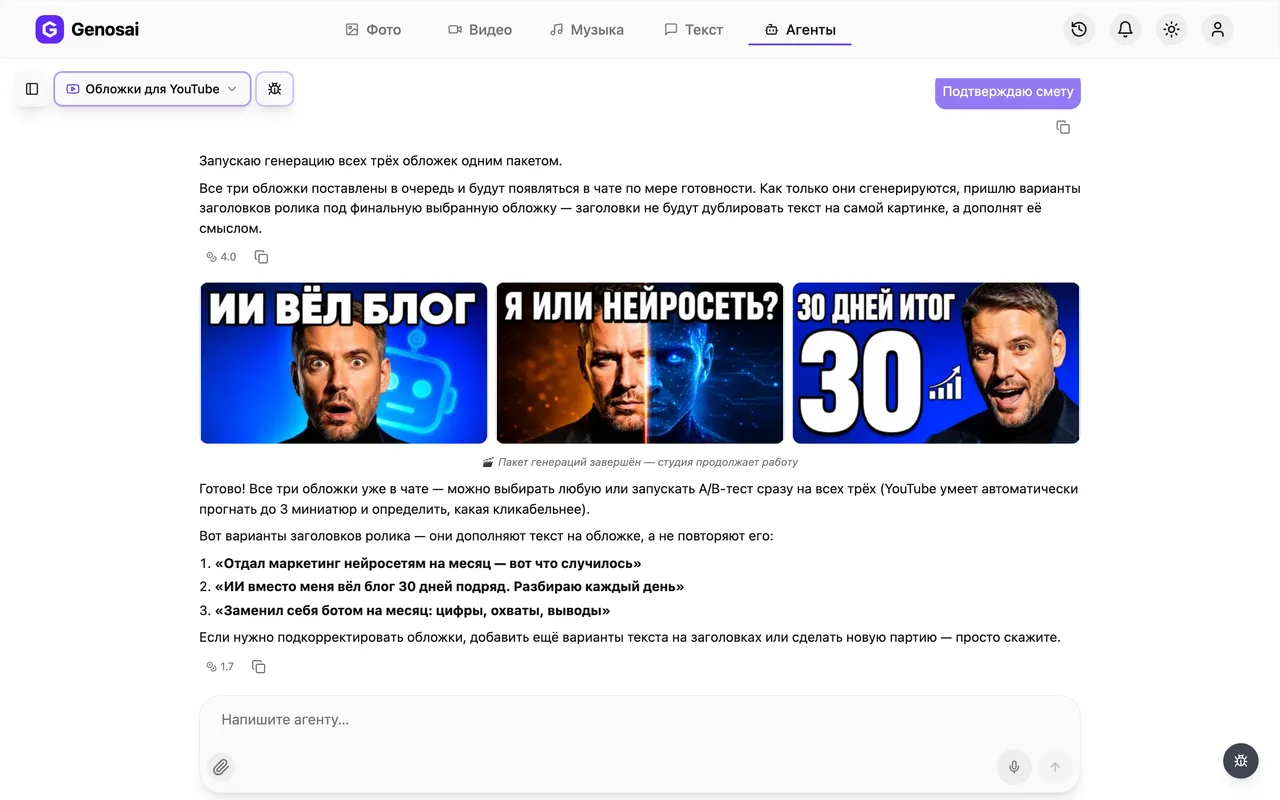
- Three concepts for testing — You get three thumbnails built on different click mechanics, matching the three slots of the YouTube thumbnail test.
- Your own face on it — Attach a portrait of the host or a frame from the video and the person on the thumbnail looks like you, not a stock model.
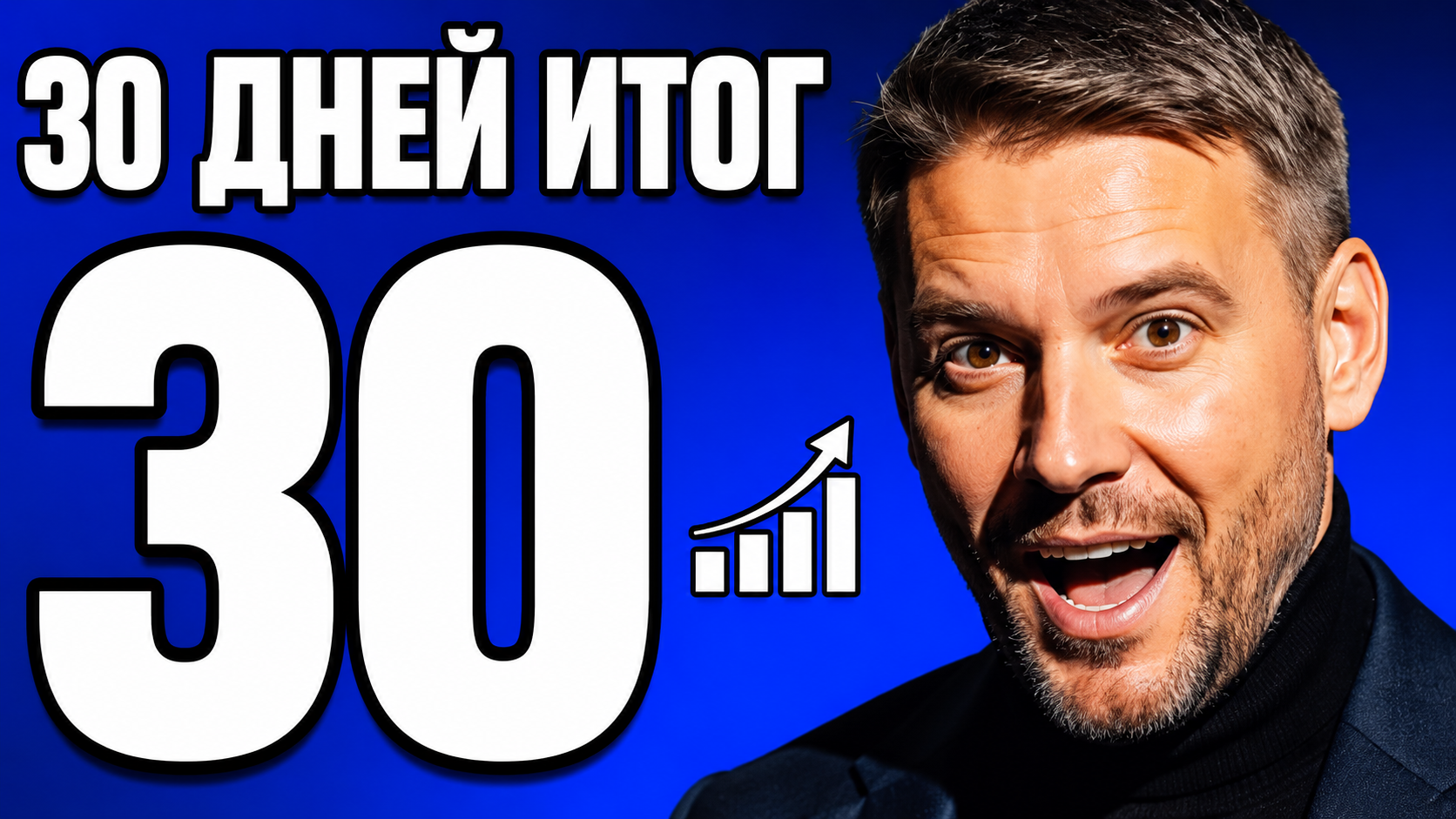
- Text that reads at thumb size — Three to five words, very large, with a contrast outline, so the image still works in a crowded mobile feed.
- Video titles included — After the images the agent suggests three video titles that complete the thumbnail instead of repeating its wording.
- Platform rules applied — Key elements stay clear of the timestamp corner and never sit tight against the edges of the frame.
- Cost shown before payment — An estimate card appears before anything is drawn, and nothing leaves your balance until you press confirm.
What it produced


Step-by-step guide
1. Step 1. Create your account
Open Genosai and sign up with your email or a one click login. New accounts receive starter credits, so you can produce your first set of thumbnails immediately. No card details are required here.

2. Step 2. Open the studio
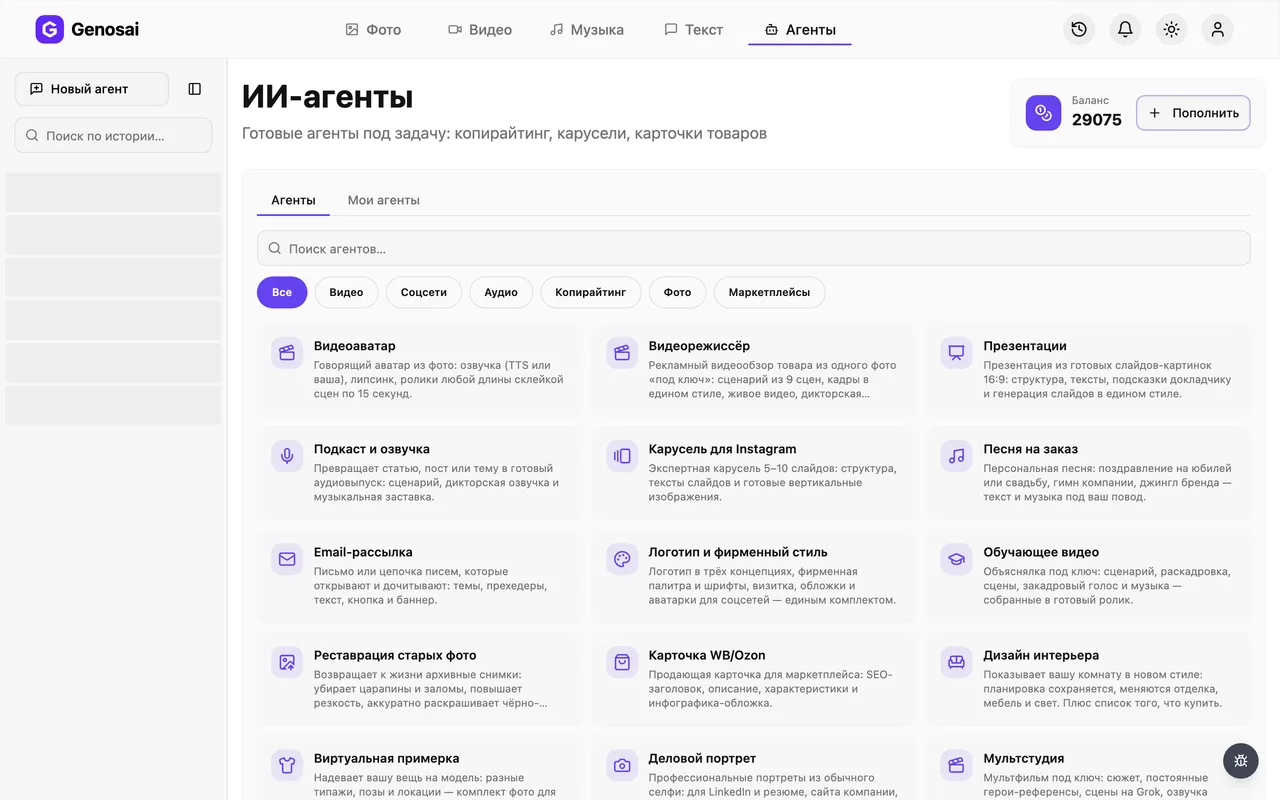
Signing in takes you to the studio. The Agents tab at the top holds ready made assistants for specific jobs. Click it to open the list.
3. Step 3. Find the thumbnails agent
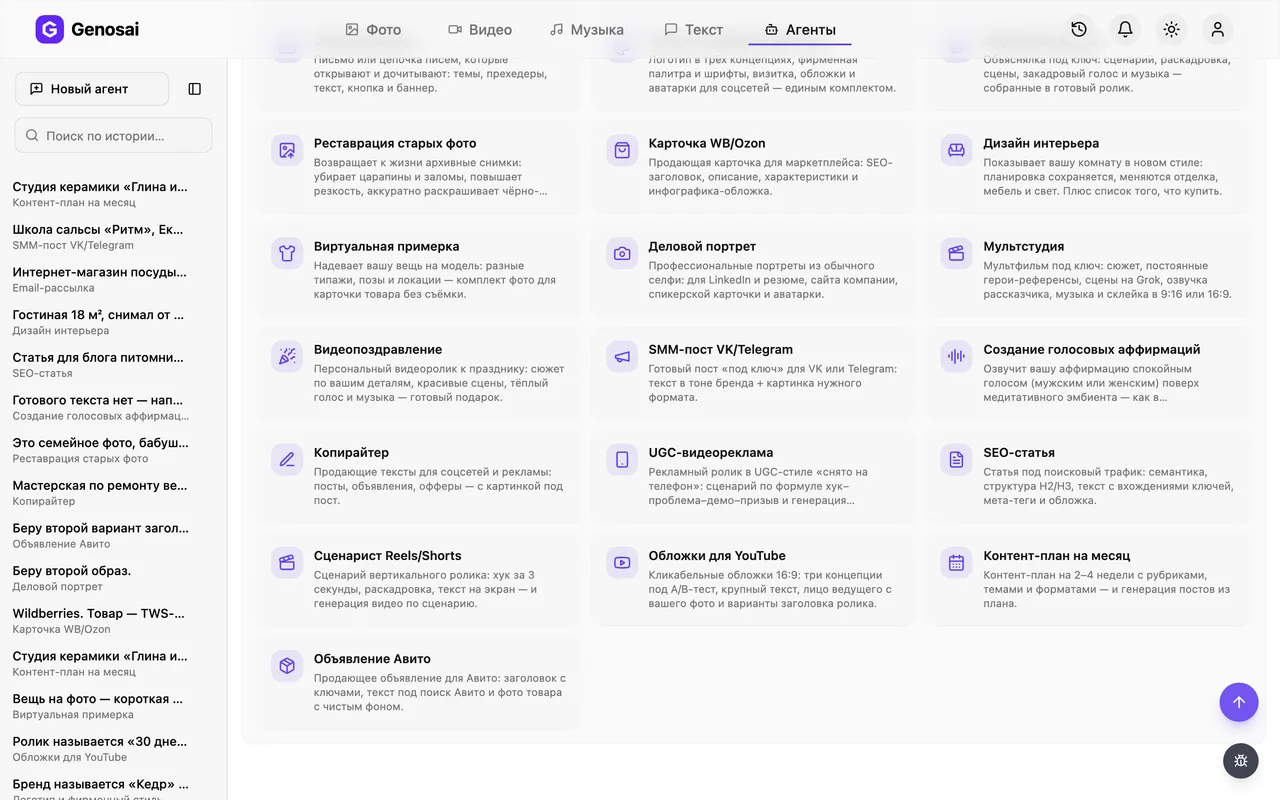
Search the gallery for thumbnail or YouTube, or open the video category. The card you need carries a YouTube icon. Click it and the chat opens.
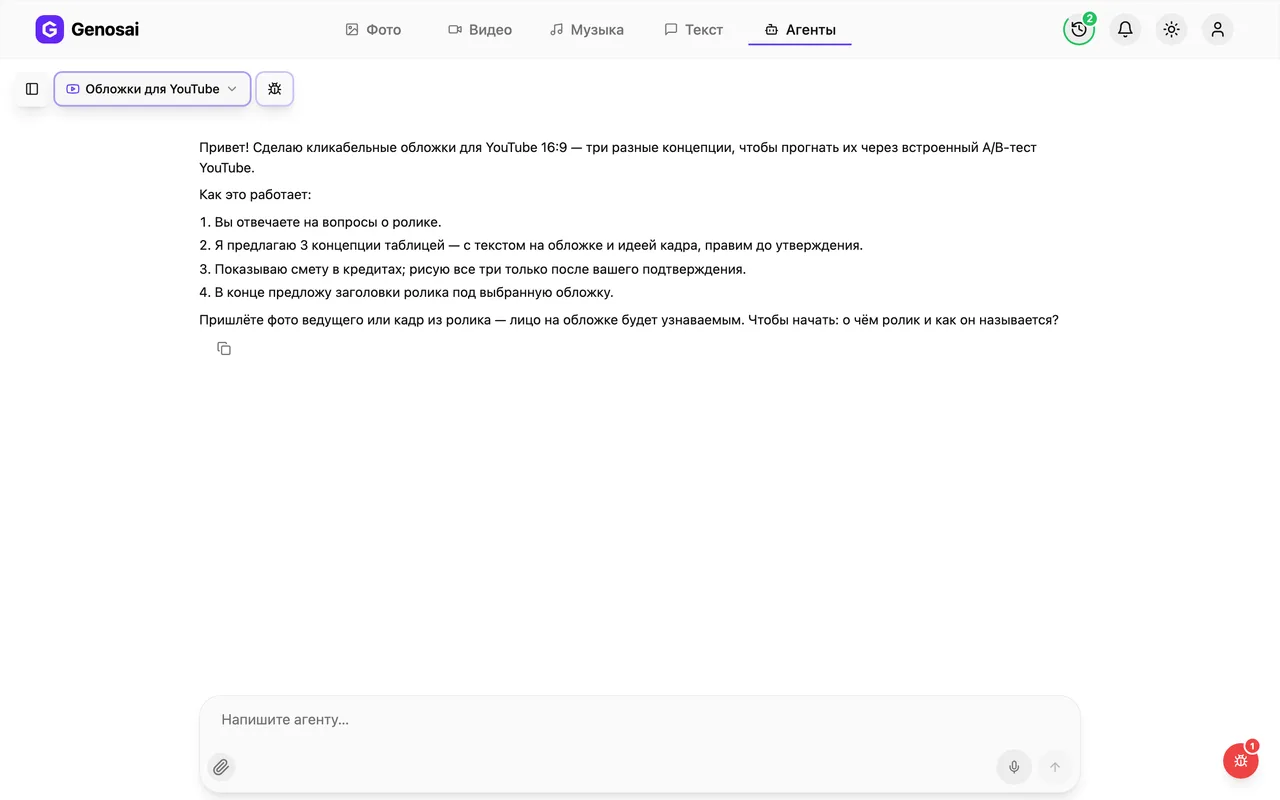
4. Step 4. Read the greeting
The agent introduces itself, explains the flow of work and asks its first question: what is the video about and what is its working title. Answer in plain words, no special phrasing needed.
5. Step 5. Answer the brief questions
The agent asks a numbered list: topic and working title, channel niche and audience, whether the thumbnail targets cold viewers from recommendations or your own subscribers, what text should appear on the image and what your channel colours are. One message is enough. If you do not know something, say so and the agent decides for you.
The most important answer is the goal. Cold viewers need strong emotion and curiosity, existing subscribers just need a clear topic.
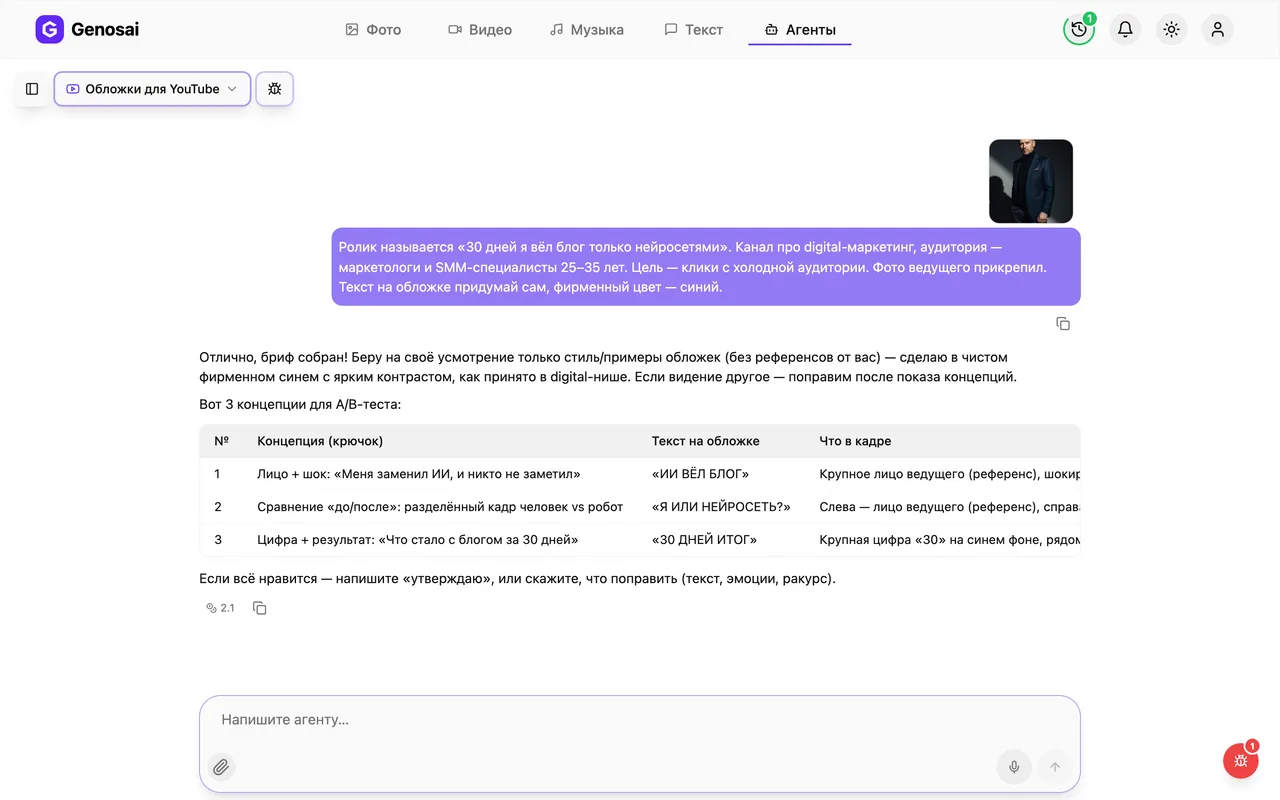
6. Step 6. Attach a photo of the host
Click the paperclip in the message box and attach a portrait of the host or a frame from the video. A normal phone photo works, as long as the face is large and well lit. Without a photo the agent draws a generic person and you lose recognisability.
One good portrait is enough. Skip dark rooms, wide shots and back views, they make the face on the thumbnail worse.
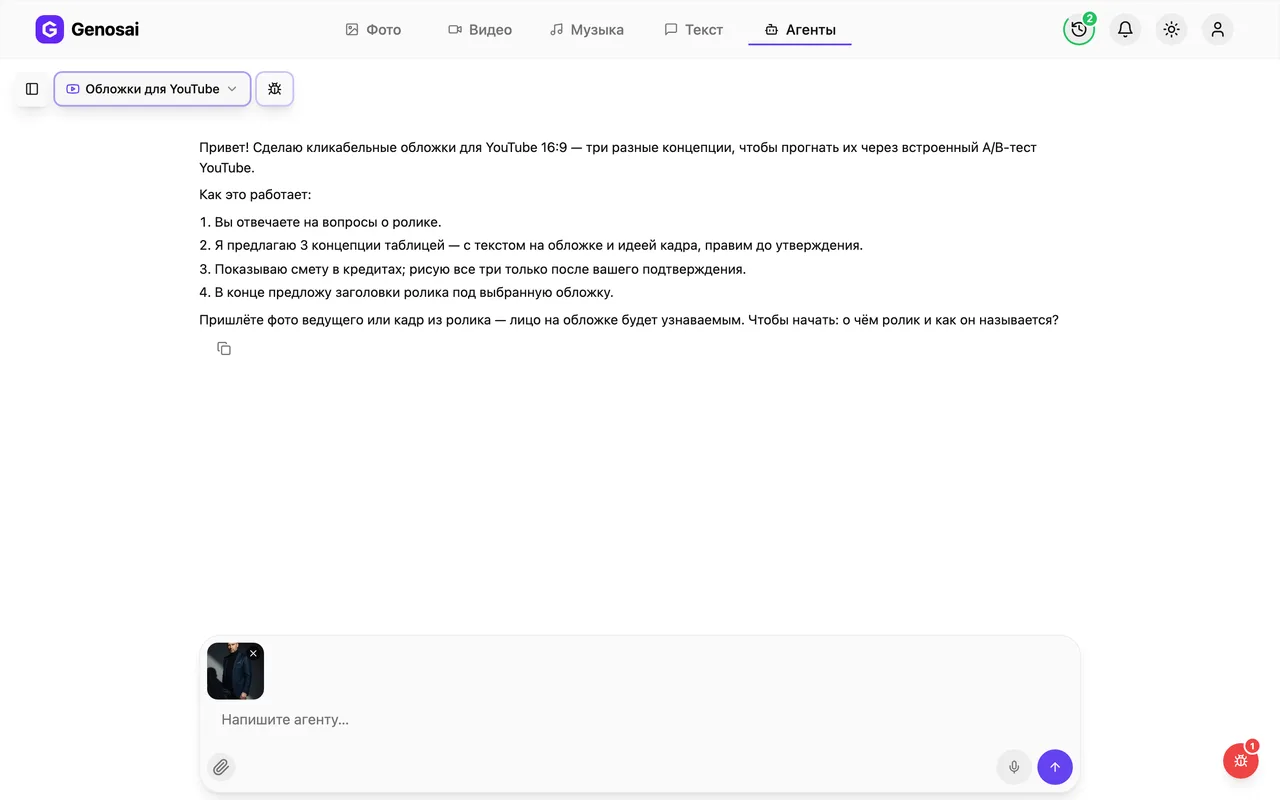
7. Step 7. Approve the three concepts
The agent sends a table with three ideas: the hook, the text on the image, what is in frame, the emotion and the colour. Each one uses a different click mechanic, such as a face with strong emotion, a before and after comparison, or a big number or result. Edit them as often as you like and reply ok when you are happy.
Editing concepts is free. Credits are only spent when the images are drawn.
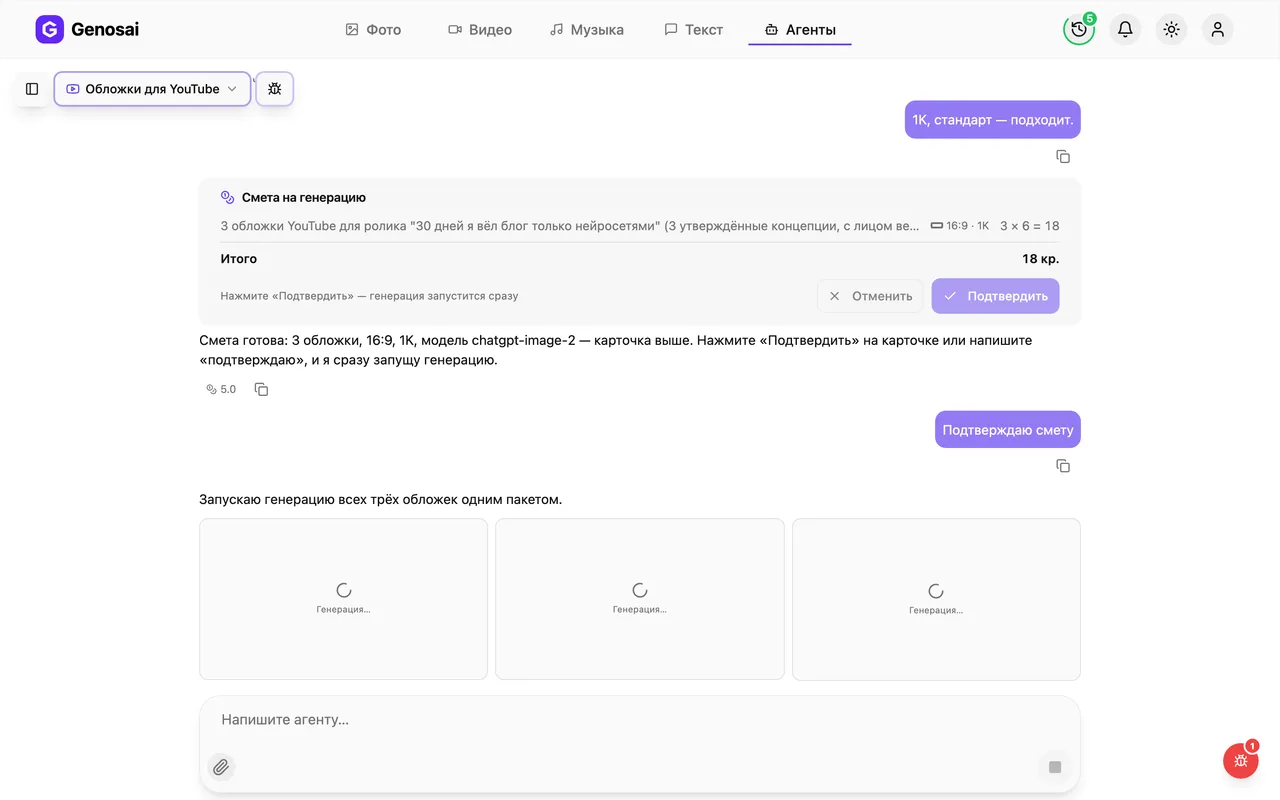
8. Step 8. Confirm the estimate
The agent asks about image quality and shows the estimate card: three thumbnails and the price in credits. This is the only moment when credits are spent. Press the confirm button or reply with the single word confirm.
Long replies such as yes, love it, go ahead are deliberately not treated as approval, so credits are never spent by accident.

9. Step 9. Wait for the images
All three thumbnails are launched as one batch: tiles labelled Generating appear in the chat and each turns into a thumbnail as it finishes, usually within a minute or two. You can close the tab and come back later, the job keeps running.
10. Step 10. Download and upload
To save a thumbnail, click it and use the download icon in the full screen viewer. Save all three and upload them in YouTube Studio as thumbnail variants for the test. The agent finishes by offering three video titles that match the concept you liked most.
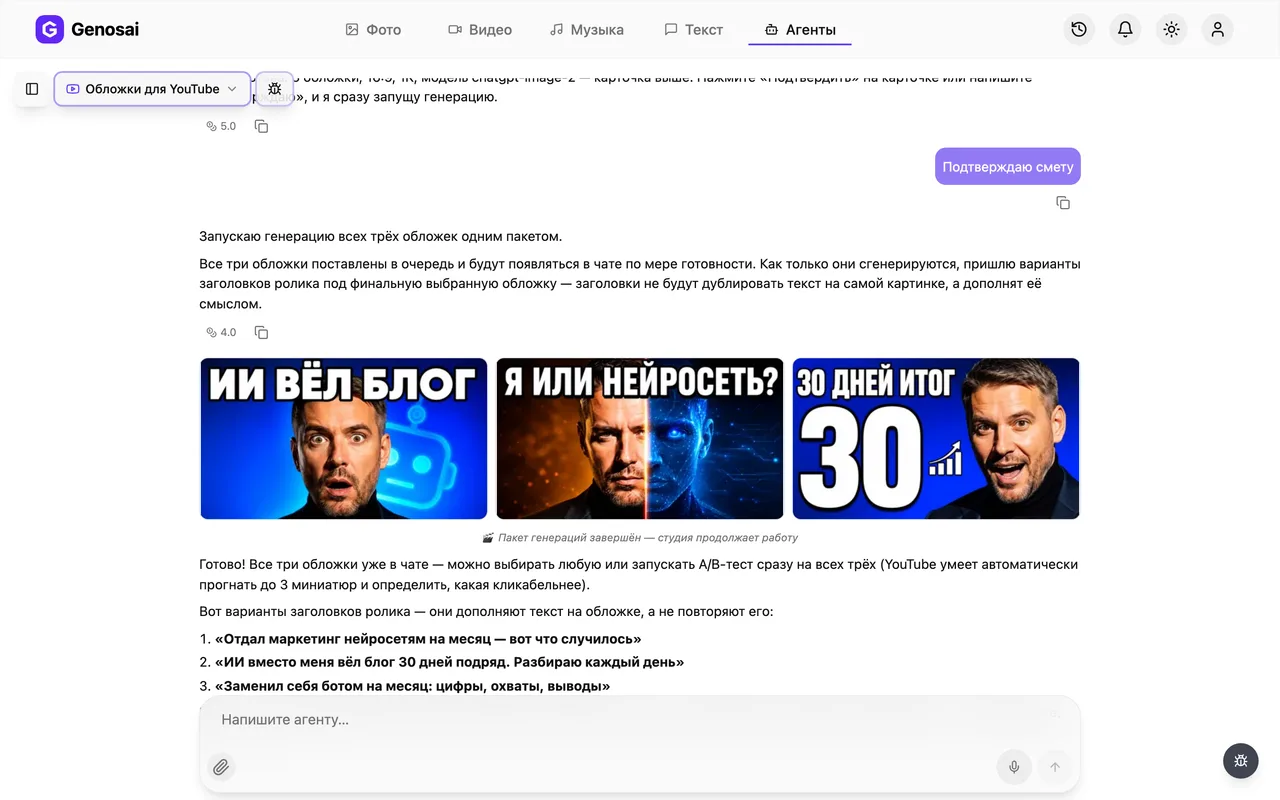
What this agent does
This agent draws YouTube thumbnails, the small preview images that decide whether a viewer opens your video or scrolls past. The format is always 16:9, exactly as the platform expects.
It does not behave like a random image generator. It behaves like an art director. First it asks about the video and the audience, then it invents three different concepts and lays them out in a table: the hook in one sentence, the text on the image, what is in frame, the emotion and the colour. The three ideas are deliberately built on different click mechanics. One leans on emotion through a large face, another on a before and after comparison, the third on a big number, a result or a piece of curiosity.
Three variants is not an arbitrary number. YouTube has a built in thumbnail test: the platform shows different images to different viewers and after a few days keeps the one earning the most clicks. That test holds exactly three variants.
Into every image the agent bakes rules that beginners usually learn the hard way. No more than three to five words, set very large with a contrast outline. One main subject in frame, two or three objects at most. A large, well lit face with a readable emotion. Nothing important in the bottom right corner where YouTube prints the timestamp, and nothing squeezed against the edges.
If you attach a photo of the host, it goes into the work as a reference and the person on the thumbnail resembles you. That is the whole point of attaching it.
Who it is for
New creators who already publish videos but assemble thumbnails from a random freeze frame and a caption in small type. Those are exactly the thumbnails that quietly cost views.
Experts and founders who run a channel single handedly and do not want a designer on retainer for one image a week. Online schools where every lesson needs a recognisable cover in a shared style. Editors who deliver a finished video to a client and want to hand over ready made thumbnails with it.
And of course anyone who has never used an AI tool. The whole conversation happens in ordinary language, with no settings to learn and no technical vocabulary required.
What to prepare in advance
Only one thing is truly required: knowing what the video is about and its working title. Without that the agent will not start.
Three things help a lot. First, a good photo of the host, an ordinary phone portrait where the face is large and well lit. Second, clarity about the audience, because a thumbnail aimed at cold viewers in recommendations is built differently from one aimed at loyal subscribers. Third, your channel colours, if you have them, so the new images sit alongside your old ones.
Nice to have but optional: a couple of examples of thumbnails you admire, and a rough idea of the text you want on the image. If you have no text, the agent writes it and shows it for approval.
You also need credits on your balance. They are only spent on drawn images, while the conversation itself costs very little.
Walking through a real conversation
Here is what an actual exchange looks like.
You. The video is about how I built a vegetable garden on my balcony in one month. The channel is about gardening and plants, mostly watched by women over forty. I want clicks from cold audiences.
Agent. Understood. Three things left: do you have a photo of the host or a frame from the video, what text would you like on the image, and does the channel have brand colours. If you have no text in mind, I will propose one.
You. Photo attached. Write the text yourself, colours are green and white.
Agent. Great, I will use the photo so the face stays recognisable. Here are three concepts, take a look at the table.
A three row table arrives. Concept one: a large surprised face against a green balcony with a three word caption. Concept two: the frame split in half, an empty balcony on the left, dense greenery on the right, a caption about thirty days. Concept three: a big harvest number with hands holding tomatoes.
You. I like the second one but make the caption shorter. In the third one swap tomatoes for strawberries.
Agent. Updated. Concept two now has a three word caption and concept three uses strawberries. Here is the revised table.
You. Ok, approved.
Agent. Now image quality. By default I work in standard quality, which comfortably exceeds what YouTube requires. High and maximum cost more. Shall we keep standard?
You. Yes.
An estimate card appears: three thumbnails, standard quality, the price in credits. Nothing has been charged yet. You press confirm, and a minute later three images show up in the chat.
Agent. Thumbnails are ready. For the concept you preferred, here are three video titles. They complete the caption on the image rather than repeat it. And remember that YouTube can run all three thumbnails in a test and keep the best performer.
One detail worth remembering: the estimate is confirmed by the system, not by the agent. A chatty reply such as yes, brilliant, let us go is deliberately not accepted, so your credits are never spent by mistake. Press the button on the card or send the single word confirm.
What it costs
Thumbnails have no fixed price. The cost depends on how many images you order and the quality you pick, so the agent calculates an estimate for your specific request and shows it before starting.
The maths is easy. A standard set costs roughly the same as three images, because three is the default. Ask for five variants and the estimate grows accordingly. Higher quality settings cost more than standard, although standard already covers the platform requirements with room to spare.
The chat itself is billed separately and is very cheap. The real credits go into drawing.
The rule to remember is simple: nothing is charged until you press confirm. Discuss concepts for as long as you want, rework the table five times, change your mind and leave, and your balance stays untouched.
If one of the images fails for a technical reason, the credits return to the estimate automatically and the agent reruns just that image.
Common beginner mistakes
The first mistake is asking for a long caption. It feels helpful to explain more on the image, but thumbnails are seen on phones at fingernail size, and anything longer than five words becomes a grey blur. Long explanations belong in the video title.
The second mistake is attaching a poor photo. A shot taken in the dark, from behind or from far away gives you a mushy face. One decent daylight portrait beats ten random frames.
The third mistake is approving the concept table too quickly. Editing ideas is free, redrawing finished images costs credits. Five minutes of careful reading saves a whole estimate.
The fourth mistake is promising something the video does not deliver. That click works once, then the viewer leaves in the first seconds and the platform stops recommending your channel.
The fifth mistake is uploading only one thumbnail. The point of a set is to let the platform pick the winner. Keep a single variant and you will never learn whether another idea performed better.
Why this beats designing the thumbnail yourself
Making a thumbnail by hand takes anywhere from half an hour to a whole evening: find the frame, cut out the background, choose a font, wrestle with the outline. The agent delivers three finished options in a couple of minutes, each already built to the rules of the platform.
The second gain is in ideas rather than speed. Homemade thumbnails tend to repeat the same layout video after video. The agent deliberately gives you three different click mechanics, so you can see which one your audience responds to.
The third gain is discipline. Large text, one focal subject, safe margins, a clean zone under the timestamp: these are rules creators normally discover over years of trial and error. Here they are respected from the first attempt.
Finally, the titles. The agent writes video titles that complete the image rather than duplicate its caption. The thumbnail and title work as a pair, and the click through rate shows it.
Agents that pair well with this one
A thumbnail is only one part of packaging a video, and the other parts usually need attention too.
If the video is not shot yet, start with the script: the Reels and Shorts Scriptwriter builds a short video structure with a hook in the opening seconds. For teaching formats use the Explainer Video agent, which handles script and visuals for longer content.
When you need an ad that feels like a real person talking to camera, the UGC Video Ad agent writes the script and renders the vertical scenes as separate clips. If your reference photo is weak, get a proper portrait from the Business Headshot agent first, then attach it here.
The announcement of a new video can be written by the Social Post agent, and a month of publishing dates is covered by the Monthly Content Plan agent.
The full line up of studio assistants lives in the catalogue of all agents.
FAQ
Why three thumbnails instead of one
YouTube can show different preview images to different viewers and after a few days keep the one that earns more views. That test compares exactly three variants, which is why the agent produces three by default.
Do I have to attach my own photo
No, but thumbnails with a real face perform better. The host makes a channel recognisable and viewers click more often. Without a photo the agent draws a generic person or relies on objects and text.
What size are the thumbnails
Images come in the 16:9 ratio that YouTube requires. Standard quality already exceeds the platform requirements, higher settings only make sense if you reuse the same image elsewhere.
Can I edit the text on a finished thumbnail
Letters baked into an image cannot be edited. If there is a typo or you want different wording, ask the agent to redraw the thumbnail, which is a new estimate for the number of images you need.
How many words should go on the image
Three to five. Thumbnails are viewed on phones at roughly thumbnail size, so a long sentence turns into a grey smear. Everything else belongs in the video title.
How much does it cost
There is no fixed price. A standard set costs about the same as three images at the quality you choose, and the agent shows the exact figure in credits in the estimate before starting.
What if none of the three thumbnails works for me
Describe in words what is wrong and the agent proposes new concepts. Redrawing runs under a new estimate, so it pays to work carefully on the idea table before you confirm.