ChatGPT Image 2.5 on Genosai — precise edits, references and on-image text
ChatGPT Image 2.5 is OpenAI's image generation model and the successor of ChatGPT Image 2. It holds faces and products from references more precisely, changes only what you ask for, and renders text reliably, Cyrillic included. It has been available in Genosai since 11 September 2026 — online, with no OpenAI subscription or VPN, at the same price as ChatGPT Image 2.
Updated: September 27, 2026
- Precise references — A face, product, interior or style from your attached images carries into a new scene and stays recognizable.
- Edits only what you asked — Change the background, the packaging colour or the label text while the rest of the frame stays intact.
- On-image text, Cyrillic included — Posters, labels and covers with readable captions in English, Russian and other languages.
- Up to 16 references, 20,000-character prompts — Complex scenes with a long brief and a stack of sample images in a single request.
- 13 frame ratios, up to 4K — From auto and 1:1 to 21:9, 27:16 and 9:8 — for social, banners, marketplaces and print.
Contents
- What is ChatGPT Image 2.5
- Capabilities
- Examples
- How to use on Genosai
- Prompts
- Generation cost
- How it compares
- Limitations and tips
- FAQ
What is ChatGPT Image 2.5
ChatGPT Image 2.5 is an image generation model from OpenAI, released on 8 September 2026. It is the direct successor of ChatGPT Image 2: the same line and the same focus on images with text, but with an emphasis on precision. The model arrived in Genosai on 11 September 2026 and runs right in the browser — no OpenAI account, no keys and no VPN.
The biggest change compared with ChatGPT Image 2 is how the model treats your source material. When you attach a photo of a face, a product or an interior, the new model carries it into a different scene noticeably more precisely: facial features stay recognizable, the shape and colour of the packaging do not drift, and the style is preserved. And when you ask to fix one specific detail — swap the background, recolour a box or replace the text on a label — the model changes exactly that and does not redraw the rest of the frame.
The second strength is long, complex prompts. ChatGPT Image 2.5 parses descriptions that list many objects, their placement, the lighting and exact text more carefully. A prompt can run up to 20,000 characters, and a single request can carry up to 16 reference images. That is handy when you build a scene from a detailed brief or want to show the model several shots of a product from different angles at once.
The third is text inside the image. Captions on posters, packaging and covers come out cleaner, and not only in Latin script: the model writes Russian confidently. The examples below include a coffee label and an event poster where every Cyrillic letter matched the prompt exactly.
Who is ChatGPT Image 2.5 for. Marketplace sellers and shop owners who need to show the same product in different scenes or change the packaging colour without a new photo shoot. Marketers and social media managers who need banners and posters with text in several languages. Designers who edit approved layouts and want the model to leave the signed-off parts alone.
Capabilities
ChatGPT Image 2.5 both generates from scratch and edits by references. There is no separate mode switch: as soon as you attach images, the studio moves into editing mode on its own.
Generation from a description
Without references the model builds a frame from text alone: a product shot, an interior, a portrait, an illustration or a poster. The more detailed the description, the more accurate the result — the model keeps long lists of details well, so there is no need to cut your brief down to a couple of words.
Editing by references
Attach one to 16 images and describe what to do. You can ask to change a product's background, recolour the packaging, replace a caption, add or remove an object, or move a person or item into a new setting. The key difference from its predecessor is that the model changes only what you named and leaves everything else as it was.
Recognizable faces, products and interiors
If a series of frames needs the same hero, product or room, ChatGPT Image 2.5 carries them over from the reference more precisely. That helps with product cards, ad series, carousels and stories, where the viewer should recognize the subject at first glance.
Text on the image
The model draws headlines, captions, labels and signage right in the frame — including in Russian. Put exact text in quotes inside the prompt: that tells the model it is a caption to render, not part of the scene description.
Formats and quality
Available ratios are auto (follows the reference), 1:1, 16:9, 9:16, 4:3, 3:4, 3:2, 2:3 and 21:9, plus 27:16, 16:27, 9:8 and 8:9 — the last four at 1K only. Quality comes in three levels: 1K, 2K and 4K. For feeds and drafts 1K is enough; for print and large banners choose 4K.
Examples
Below are real images generated by ChatGPT Image 2.5 in Genosai at 1K quality. Under each picture is the exact prompt it was made from. The first two prompts are in English with the Russian caption text inside quotes — a good way to test how the model handles Cyrillic.
!ChatGPT Image 2.5 — coffee bag with a Russian label, generated in Genosai
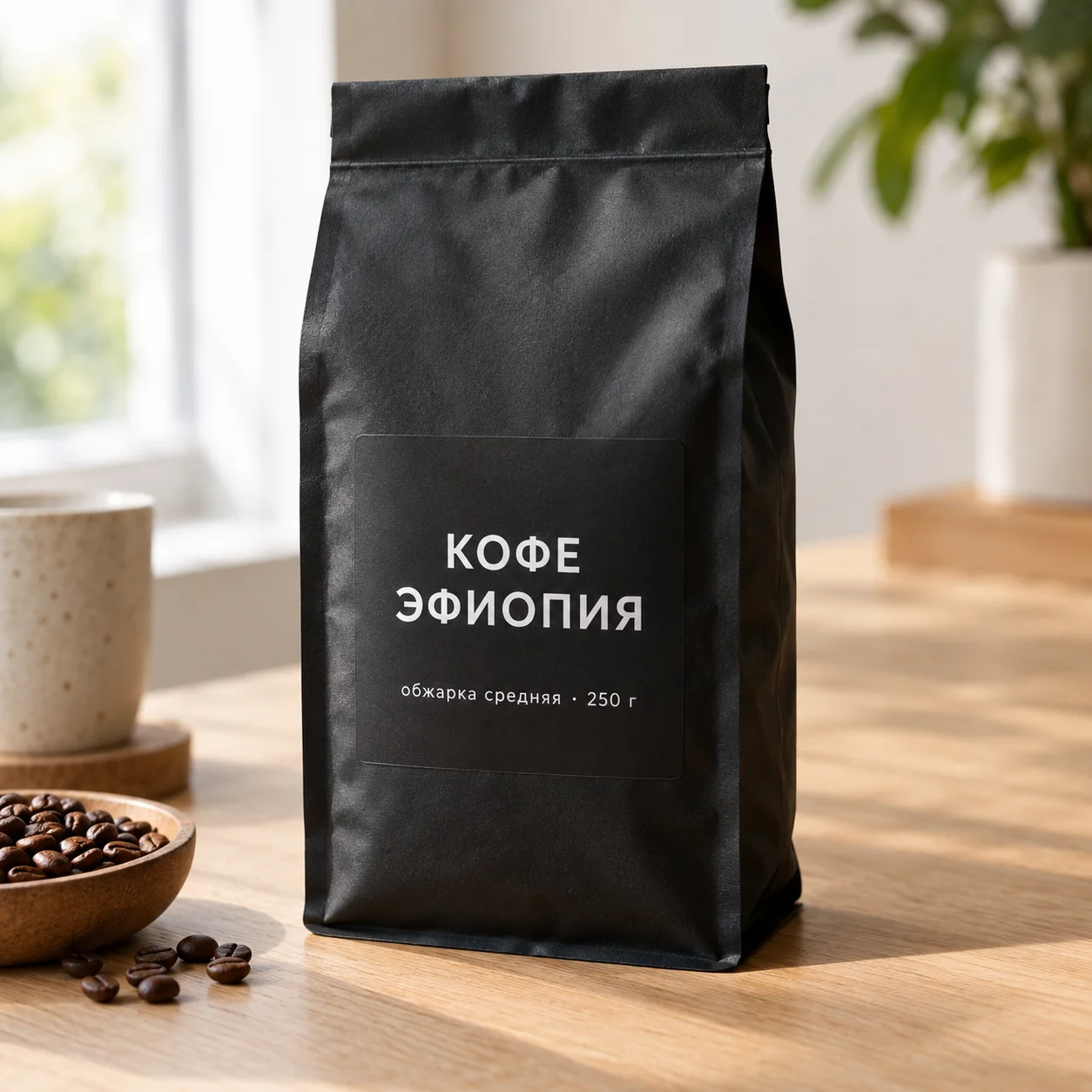
_Generated in Genosai.io with ChatGPT Image 2.5, 1:1 ratio. Prompt:_
Studio product photo of a matte black coffee bag standing on a light oak table, soft window light from the left, shallow depth of field. The bag label reads exactly in Russian: "КОФЕ ЭФИОПИЯ" in large white letters and below smaller "обжарка средняя · 250 г". Realistic packaging texture, no other text, no logos.Both lines on the label match the prompt without a single mistake — the large product name ("Ethiopia coffee") and the small line with the roast level, weight and dot separator.
!ChatGPT Image 2.5 — lecture poster with Russian text, generated in Genosai
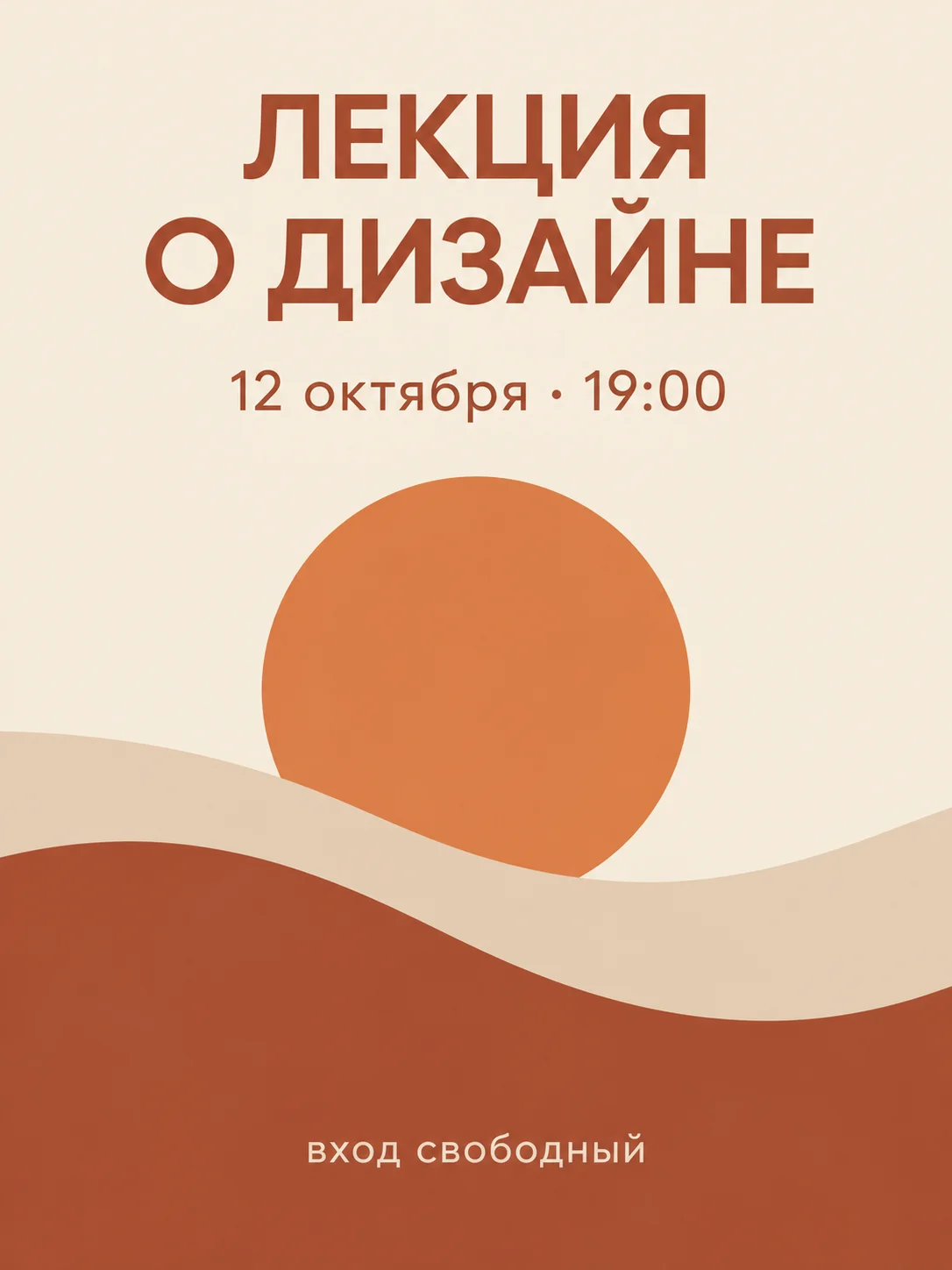
_Generated in Genosai.io with ChatGPT Image 2.5, 3:4 ratio. Prompt:_
Minimalist event poster, vertical layout, warm terracotta and cream palette, abstract sun shape. Exact Russian text, perfectly spelled: title "ЛЕКЦИЯ О ДИЗАЙНЕ", below "12 октября · 19:00", at the bottom "вход свободный". Clean modern sans-serif typography, no other text.All three lines of the poster — the title ("A lecture on design"), the date with time and the "free entry" line at the bottom — are spelled correctly and sit where the prompt placed them.
!ChatGPT Image 2.5 — Scandinavian living room, generated in Genosai
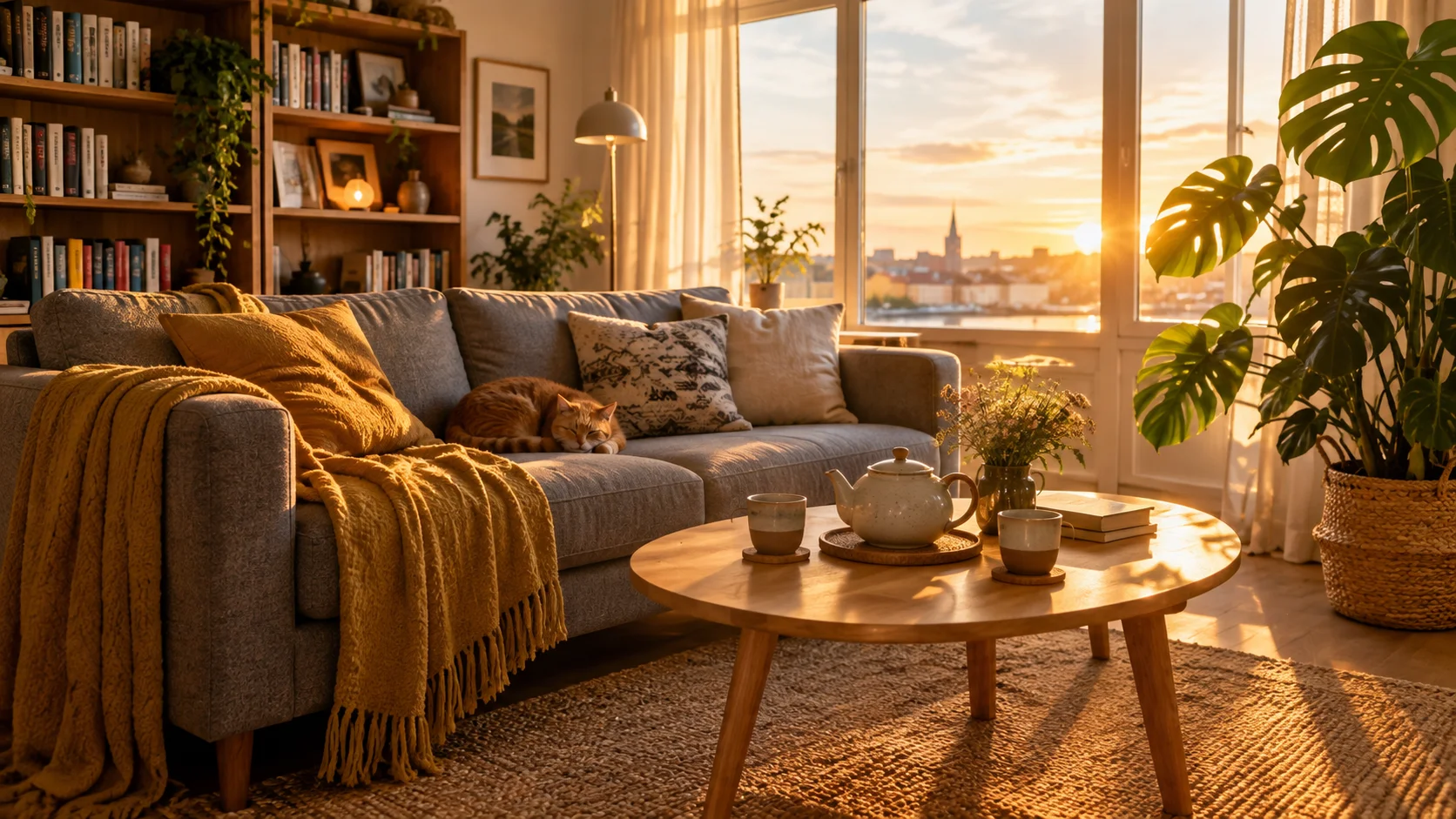
_Generated in Genosai.io with ChatGPT Image 2.5, 16:9 ratio. Prompt:_
Cozy Scandinavian living room at golden hour: a grey sofa with a mustard throw blanket, a round wooden coffee table with a ceramic teapot and two cups, a tall monstera plant in a woven basket on the right, a bookshelf on the left, a sleeping ginger cat on the sofa, warm sunlight through large windows, photorealistic interior photography, no text.The third example tests how well the model follows a long prompt: the sofa, the throw, the table with a teapot and two cups, the monstera on the right, the bookshelf on the left and the ginger cat — every listed object is in place. Each of the three pictures cost 6 credits.
How to use on Genosai
ChatGPT Image 2.5 is already connected in Genosai, so there is nothing to set up. The path from sign-in to a finished picture looks like this.
- Sign in at genosai.io and open the photo studio.
- Pick ChatGPT Image 2.5 from the model list.
- Set the frame ratio and quality — 1K, 2K or 4K.
- For an edit, attach one or more images (up to 16) — editing mode turns on by itself.
- Describe the task: subject, light, style, and put exact text in quotes.
- Run the generation and refine the result with a follow-up request if needed.
Via the API
For automation the model is available in the Genosai public API. A task is created with a request to https://api.genosai.io/v1/createTask, and its status is checked with GET /v1/taskInfo?taskId=. References go in the image_urls field.
curl -X POST "https://api.genosai.io/v1/createTask" \
  -H "Authorization: Bearer sdk_…" \
  -H "Content-Type: application/json" \
  -d '{
    "model": "chatgpt-image-2-5",
    "input": {
      "prompt": "Event poster with the exact title \"DESIGN LECTURE\", no other text",
      "aspect_ratio": "3:4",
      "resolution": "1K"
    }
  }'
API billing works the same way as in the studio: per generation, with no subscription.
Prompts
The templates below show how to set tasks for ChatGPT Image 2.5. Replace the text in brackets with your own details. You can write prompts in English or in Russian — what matters is being specific.
Studio product photo of [product] on a [surface], soft window light from the left, shallow depth of field, the label reads exactly: "[text]", no other text, no logosMinimalist poster for [event], vertical layout, [colours] palette. Exact text, perfectly spelled: title "[title]", below "[date and time]", at the bottom "[caption]". Modern sans-serif typography, no other textReplace the background of the attached product photo with [new background]. Do not change the product itself, its shape, colour or labelsRecolour the packaging from the reference to [colour]. Keep the logo, the label text and the camera angle exactly as they areOn the label, replace the text "[old text]" with "[new text]" in the same font. Leave the rest of the image untouchedPlace the person from the attached photo in [scene], keep the facial features, hairstyle and clothing, natural light, photorealisticInterior of a [room type] in [style]: [list of objects and where they stand], warm daylight, wide 16:9 frame, photorealistic photography, no textGeneration cost
In Genosai ChatGPT Image 2.5 is priced by image quality: 1K is 6 credits, 2K is 10 credits and 4K is 16 credits per picture. That is exactly the same as ChatGPT Image 2, so moving to the new version does not raise your spend. You pick the quality before launch, so the price is known up front.
A sensible scheme is to work out composition and wording at 1K, then regenerate the winning variant at 2K or 4K for the final layout. There is no subscription: you pay only for the generations you make, and top-ups work with Russian bank cards without a VPN. Current rates and balance are in Pricing.
How it compares
The closest relative is ChatGPT Image 2. Both models cost the same, so for new tasks with references and precise edits it makes sense to go straight to version 2.5.
| Parameter | ChatGPT Image 2.5 | ChatGPT Image 2 |
|---|---|---|
| Quality | 1K, 2K, 4K | 1K, 2K, 4K |
| Price per frame | 6 / 10 / 16 credits | 6 / 10 / 16 credits |
| References | up to 16 | up to 16 |
| Accuracy of carrying over a reference | higher | baseline |
| Editing without touching the rest of the frame | yes | less often |
| Frame ratios | 13, including 3:2, 2:3, 21:9 | 6 |
If you need a different look or conversational editing, compare the result with Nano Banana Pro and Nano Banana 2. For affordable stylized frames there is Seedream 5 Lite. All models live in one Genosai interface, so you can run the same task through several of them and pick the best fit for price and quality.
Limitations and tips
ChatGPT Image 2.5 is noticeably more precise than its predecessor, but you should still check the result before publishing. Reread every caption on the image — especially small print, prices and dates — and look closely at details such as fingers, reflections and logos in the background. For exact text, always put it in quotes and state explicitly that there should be no other text in the frame.
Keep the format limits in mind: 27:16, 16:27, 9:8 and 8:9 are available only at 1K. If you need 2K or 4K, pick one of the main ratios — 1:1, 16:9, 9:16, 4:3, 3:4, 3:2, 2:3 or 21:9.
When editing by references, name not only what to change but also what must stay untouched: "do not change the product, the logo or the angle". That way the model understands the boundaries of the task more precisely. A vague prompt like "make it nice" leads to an average result — it is better to list the light, background, angle and style.
And work iteratively: drafts at 1K, the final at 2K or 4K. That way you spend fewer credits searching for the idea and pay for high quality only once the composition is found.
FAQ
What is ChatGPT Image 2.5 and who built it?
ChatGPT Image 2.5 is an image generation model from OpenAI, released on 8 September 2026. It succeeds ChatGPT Image 2: it works with references more precisely, makes cleaner targeted edits and handles long prompts and on-image text better. It has been available in Genosai since 11 September 2026.
How is ChatGPT Image 2.5 better than ChatGPT Image 2?
The new version holds faces, objects, interiors and style from references more precisely, changes only what you asked for and follows long, complex prompts better. Text inside the image, including Cyrillic, comes out cleaner. The price stays the same: 6, 10 and 16 credits for 1K, 2K and 4K.
How much does one ChatGPT Image 2.5 generation cost?
In Genosai the price depends on quality: 1K costs 6 credits, 2K costs 10 credits and 4K costs 16 credits per image. You pay per actual generation, with no monthly subscription, and top up whenever you need.
How do I edit my own photo with ChatGPT Image 2.5?
Attach an image in the photo studio and the reference editing mode switches on automatically. Then describe what to change: the background, a colour, a caption or an object. The model changes just that and keeps the rest. You can attach up to 16 images.
Which frame ratios does the model support?
Auto (follows the reference), 1:1, 16:9, 9:16, 4:3, 3:4, 3:2, 2:3 and 21:9, plus 27:16, 16:27, 9:8 and 8:9. The last four are available only at 1K quality; the rest work at 1K, 2K and 4K.
Does ChatGPT Image 2.5 have an API?
Yes. In the Genosai public API the model is called with POST /v1/createTask and the model id chatgpt-image-2-5, and task status is checked with GET /v1/taskInfo. API pricing is the same as in the studio.