Nano Banana 2 Lite: fast image generation by Google
Nano Banana 2 Lite is Google's lightweight image model powered by the Gemini 3.1 Flash Lite Image engine, released on June 30, 2026. It generates a 1K image in about 4 seconds while keeping legible text and consistent characters. On Genosai.io a shot costs a flat 4 credits.
Updated: August 10, 2026
- A shot in 4 seconds — Generates an image in about four seconds — the fastest model in the Nano Banana family.
- Legible text — Despite the focus on speed, it renders readable on-image captions for thumbnails, mockups and cards.
- Consistent character — Keeps the same face or product across different scenes, which is handy for series and brand content.
- Flat pricing — Costs 4 credits per shot regardless of the prompt, so it stays predictable across high-volume generations.
- Reliable prompt-following — Executes prompt instructions reliably, which keeps results stable during fast high-throughput work.
Contents
- What is Nano Banana 2 Lite
- Capabilities
- Generation examples
- How to use on Genosai
- Prompts
- Generation cost
- How it compares
- Limitations and tips
- FAQ
What is Nano Banana 2 Lite
Nano Banana 2 Lite is the lightweight version of Google's new generation of image models. Under the hood it runs the Gemini 3.1 Flash Lite Image engine, and it launched on June 30, 2026. Its job is to deliver the fastest generation in the Nano Banana family while keeping the recognizable quality of the 3.1 generation.
The core idea is speed and price. Nano Banana 2 Lite generates a 1K image in about four seconds, which makes it handy for fast iterations, drafts and high-throughput scenarios where you need many frames in a row. For that speed the model is deliberately capped at 1K: 2K and 4K are not available here — for those, step up to the full Nano Banana 2 or the flagship Nano Banana Pro.
Even so, Lite does not sacrifice the essentials. It keeps legible on-image text and strong character consistency — the same face or product holds across scenes. The model follows prompt instructions reliably, so results stay stable even during fast high-throughput work. Google recommends it specifically as the replacement for the first-generation base Nano Banana.
On Genosai.io, Nano Banana 2 Lite is built into the photo studio and costs a flat 4 credits per shot — like the base version, but on a new-generation engine. Every image carries an invisible SynthID mark that flags the content as AI-generated.
Capabilities
Nano Banana 2 Lite is built for one scenario — getting good 1K frames fast and cheap. Here is where that pays off most.
Around 4-second speed
The model's headline strength is generation time. A 1K frame appears in about four seconds, so Lite is handy for interactive scenarios and idea scouting, where seeing a result quickly and immediately trying another variant matters.
Legible on-image text
Despite the focus on speed, the model keeps readable on-image text. Short captions for thumbnails, covers and mockups render legibly — a clear inheritance from the 3.1 generation that the first generation handled with more trouble.
Character consistency
Lite holds the same face or product across scenes and angles. For post series, product cards and brand content, that means the hero or the packaging looks the same from frame to frame even under fast generation.
Reliable prompt-following
The model executes prompt instructions accurately, so results are predictable and stable. This matters especially in high-throughput pipelines where frames are generated in bulk and there is no time to fix each one by hand.
Predictable cost
A flat 4-credit price per shot keeps spending transparent: however complex the prompt, the cost is the same. Across high generation volumes this simplifies budget planning compared with resolution-based pricing.
Generation examples
Below are real images generated by Nano Banana 2 Lite on Genosai. Under each frame is the exact prompt.
!Nano Banana 2 Lite portrait, generated on Genosai

_Generated on Genosai.io with Nano Banana 2 Lite. Prompt: Professional studio portrait of a confident young woman, soft natural window light, shallow depth of field, photorealistic, detailed skin texture, editorial photography._
!Nano Banana 2 Lite product shot, generated on Genosai
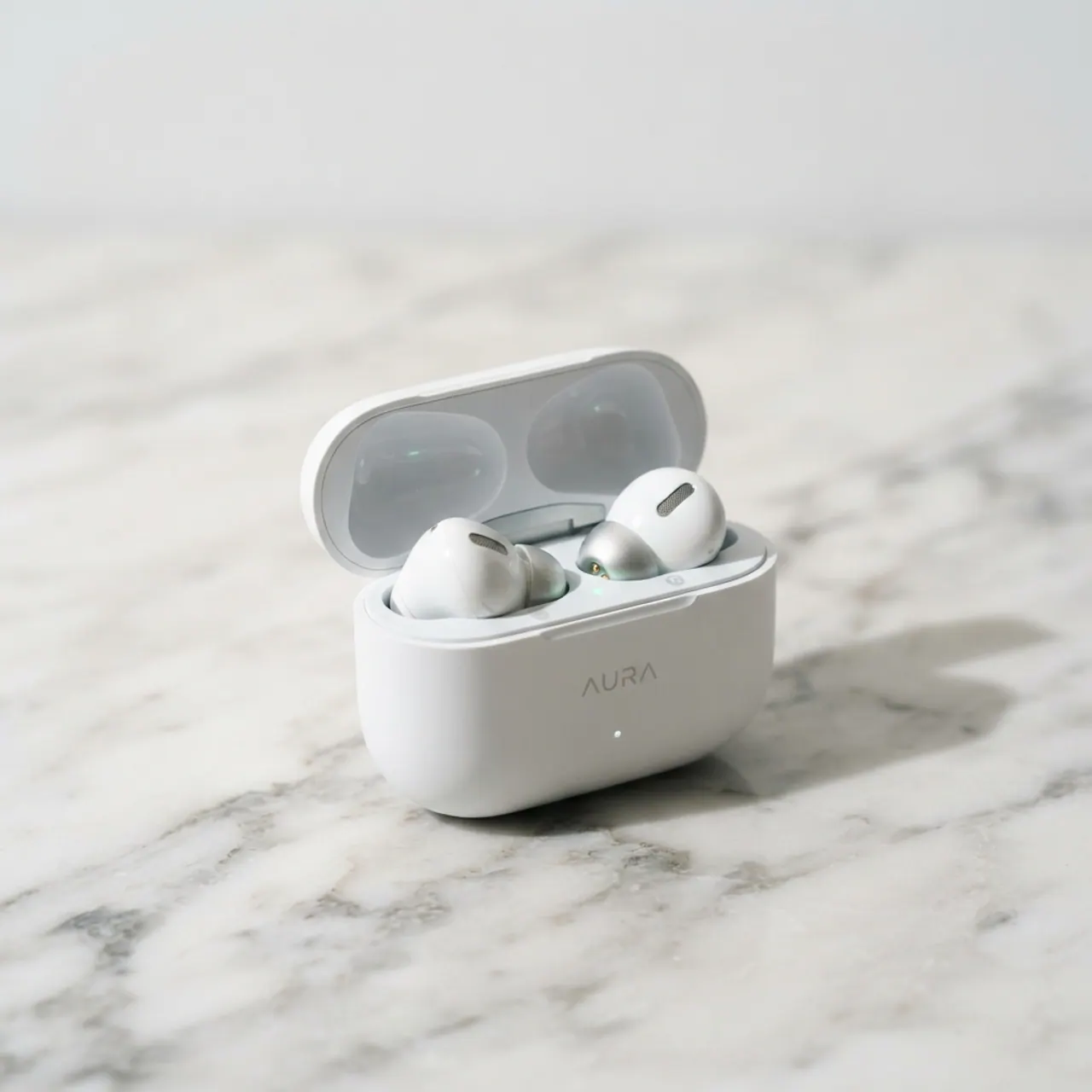
_Generated on Genosai.io with Nano Banana 2 Lite. Prompt: E-commerce product shot of premium white wireless earbuds in an open charging case on a light marble surface, soft studio lighting, crisp shadows, clean minimal background._
!Nano Banana 2 Lite storefront scene, generated on Genosai
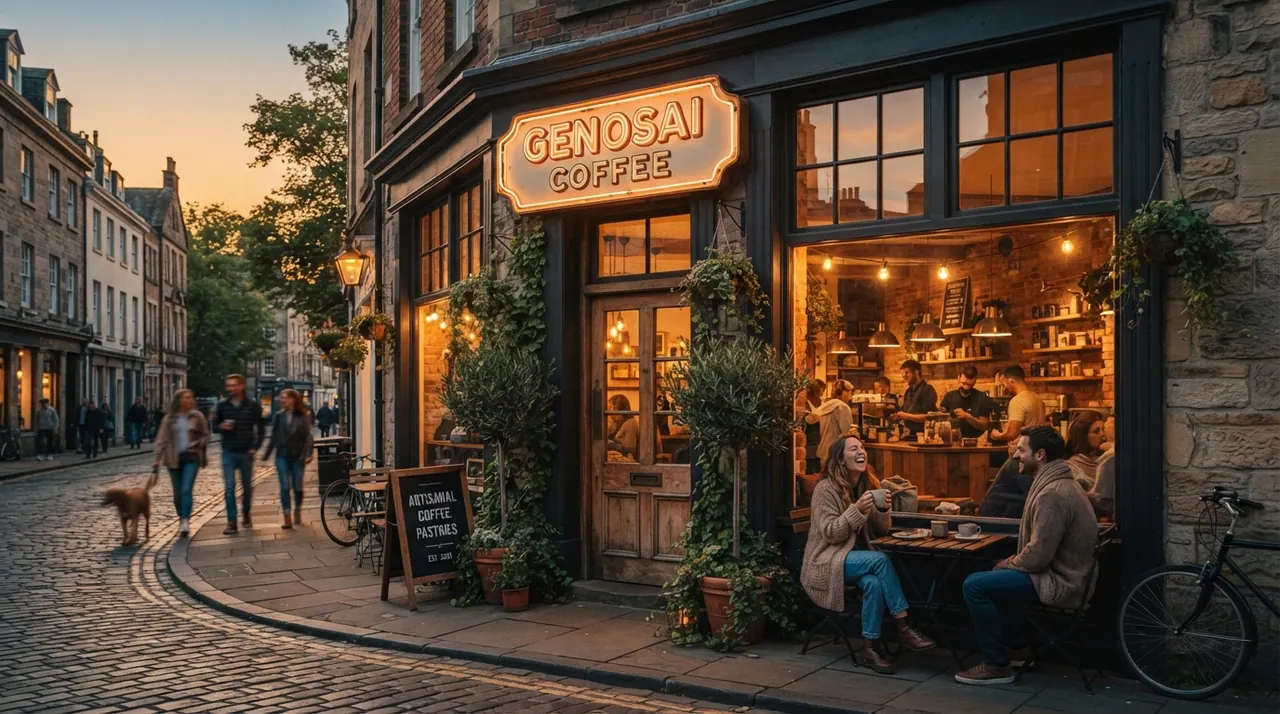
_Generated on Genosai.io with Nano Banana 2 Lite. Prompt: A cozy coffee shop storefront at golden hour with a glowing sign that reads GENOSAI COFFEE, warm cinematic light, photorealistic, ultra detailed._
These frames arrive in seconds yet keep clean light and materials: soft portrait light, readable highlights on the earbuds and a warm evening scene with a legible sign. For drafts and thumbnails, this quality at this speed is usually more than enough.
How to use on Genosai
Everything runs in the browser through the photo studio — nothing to install.
- Open the Genosai photo studio and sign in.
- Pick Nano Banana 2 Lite from the model list.
- Describe the scene: subject, light, angle and style.
- If you need a caption, type its text in quotes inside the prompt.
- Run the generation — a 1K frame appears in about four seconds.
- Cycle through variants quickly and pick the best one to refine.
Lite shines in fast-iteration mode: generate several prompt variants in a row, compare and refine. Once you have the best frame, regenerate it at higher resolution on Nano Banana 2 if needed.
Prompts
Ready-made templates for fast tasks — drop your details in for the values in angle brackets.
Fast 1K portrait: <who>, soft light, shallow depth of field, photorealisticVideo thumbnail: <scene>, large legible headline "<text>", bright contrastProduct shot draft: <product> on <surface>, studio light, clean backgroundIcon or cover: <subject>, simple composition, legible short captionSeries with one hero: <character> across <different locations>, keep the look consistentQuick scene concept: <place> under <lighting>, atmospheric photorealismVariations of one idea: <base description>, give several different anglesGeneration cost
On Genosai, Nano Banana 2 Lite is priced at a flat rate — 4 credits per shot regardless of the prompt. It is the same price as the base Nano Banana, but on a newer and faster engine. That predictable cost is especially handy where frames are generated in bulk: drafts, thumbnails, idea scouting and high-throughput pipelines.
Starter credits after sign-up let you try Nano Banana 2 Lite for free, and top-ups work with local cards without a VPN. For current rates and your balance, see Pricing.
How it compares
Nano Banana 2 Lite is the fastest model in the family. Next to it in the catalog are the full generation, the base model and affordable rivals — the choice depends on what matters: speed, resolution or price.
| Model | Class | Strength | Price per shot |
|---|---|---|---|
| Nano Banana 2 Lite | Fast | A shot in about 4 seconds | 4 credits |
| Nano Banana 2 | New generation | 2K by default and 4K | from 8 credits |
| Nano Banana | Base | Cheap 1K generation | 4 credits |
| Z-Image | Rival | Lowest generation price | 1 credit |
If you need high resolution and maximum quality, take Nano Banana 2. The base entry point to the family is Nano Banana. Among affordable rivals on speed and price, compare Z-Image and Grok Imagine. For the full list of models, see the model catalog.
Limitations and tips
The main limit of Nano Banana 2 Lite is resolution. The model works only at 1K, so for print, large formats and shots with fine detail, Nano Banana 2 or Nano Banana Pro are the better fit. Complex long typography is also easier for the flagship: Lite draws a short caption legibly, but a dense text layout is best left to Nano Banana Pro.
Like any generative model, Lite can get small geometry, hands and symmetry wrong — check important details and regenerate if needed, which is quick here. Every image carries an invisible SynthID mark flagging it as AI-generated.
To get the most out of it, use the model's strength — speed: iterate on prompt wording in short cycles and pick the best frame. Regenerate a good scene at 2K or 4K on the family's larger models if needed. For series with one hero, lock their look in the prompt.
FAQ
What is Nano Banana 2 Lite?
It is Google's lightweight, fast image model powered by the Gemini 3.1 Flash Lite Image engine, released on June 30, 2026. It generates a 1K image in about 4 seconds. On Genosai a shot costs 4 credits.
How does Nano Banana 2 Lite differ from Nano Banana 2?
Lite is tuned for speed and price: it generates at 1K in about 4 seconds, while the full Nano Banana 2 works at 2K by default and scales to 4K. Lite gives up resolution but wins on generation time.
What resolution does Nano Banana 2 Lite output?
The model generates at 1K — roughly 1024 by 1024 pixels. For 2K and 4K, the full Nano Banana 2 or the flagship Nano Banana Pro are the fit. Lite is deliberately capped at 1K for speed.
How much does a Nano Banana 2 Lite generation cost on Genosai?
One shot costs a flat 4 credits regardless of prompt complexity. That predictable price is handy for drafts, fast iterations and high-volume image work.
What tasks is Nano Banana 2 Lite good for?
For fast idea generation, drafts, thumbnails and high-throughput pipelines where speed and price matter and 1K is enough. When you need high resolution or the best text, take Nano Banana 2 or Nano Banana Pro instead.
Can Nano Banana 2 Lite write text on an image?
Yes. Despite the focus on speed, the model keeps legible on-image text. Short captions for thumbnails and mockups render clearly, but for complex long typography the flagship Nano Banana Pro is more precise.